Update 26th March 12:45
We’ve found Edge’s Autoplay setting is set to block for all NHSL’s PCs. That’s a sensible measure and may soon affect other boards. [Microsoft changed what the blocking of Autoplay achieves for Edge 146 and WebRTC streams, as used in your Near Me call, have become blocked because of that change.]
Workaround
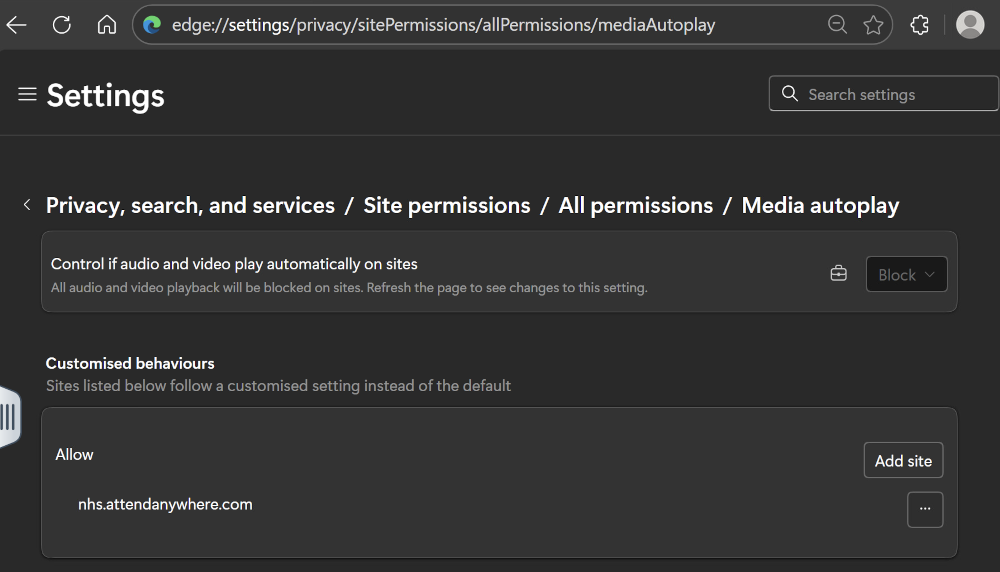
Adding nhs.attendanywhere.com to the allowlist should fix the problem. (Or use Chrome if that’s available.)
To do so, open edge://settings/privacy/sitePermissions/allPermissions/mediaAutoplay in Edge, click the Add Site button and add nhs.attendanywhere.com to the allowlist. Once done, the settings page should look similar to the image below.
Thursday 19th March 17:00
NHS Lothian Near Me users are currently experiencing issues viewing clients via the Microsoft Edge browser v146.0.3856.62. A call has been logged with the NHS Lothian infrastructure team. A temporary fix is to access Near Me (https://nhs.attendanywhere.com) via a Chrome browser.
Potential Workaround
Using Near Me via a current Chrome browser can be used as temporary fix to the problem.