Tuesday 10th March 09:00
Updating Edge from 145.0.3800.82 to 145.0.3800.97 does seem to resolve the problem.
Monday 9th March 09:45
In NVCS testing, it seems updating to Edge 145.0.3800.97 from 145.0.3800.82 may stop the problem from occurring.
Thursday 5th March 10:30
We have had reports that some installs of Edge 145 are producing situations where Service Providers can log into the Attend Anywhere platform but cannot join their callers. We have had no reports of Edge 144 causing problems.
If you encounter the problem yourself and can use a different browser (e.g. Chrome), your call may work within it. Even a different device with Edge 145 may work.
We will update this post when we have more information.
Potential Workaround
Updating to Edge 145.0.3800.97 seems to fix the problem.
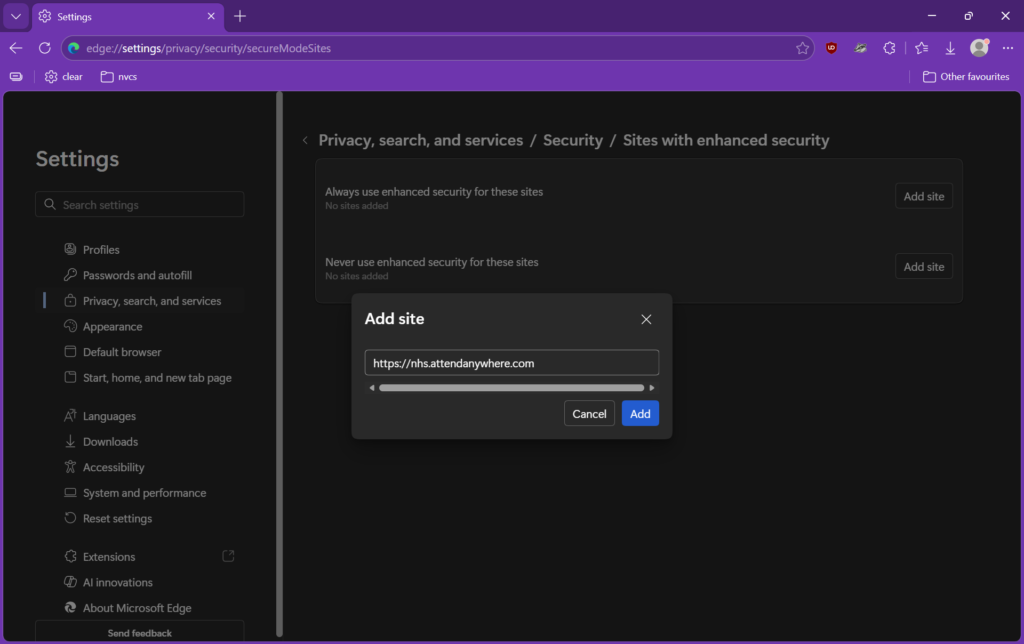
If you can’t update at present, open Edge and copy/paste this into the address bar – edge://settings/privacy/security/secureModeSites
Then click the Add site button next to Never use enhanced security for theses sites and add this address – https://nhs.attendanywhere.com
Click the Add button.